
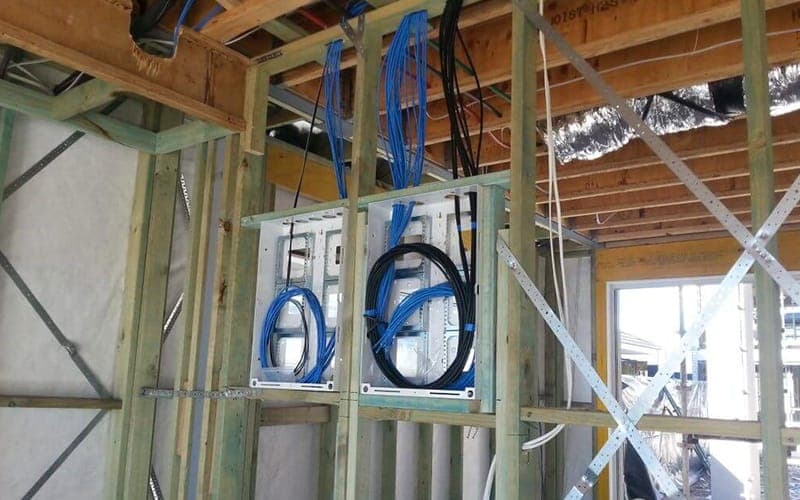
New builds & renovations
Pre-wiring for new builds.
Pre-wiring can help almost any smart home system, including wireless ones. After all, wireless devices must ultimately connect to cabled equipment. If you're building, put it at the top of your priority list.
Don't leave it to the electrician
Electricians lay wires for electrical switches and outlets, but the majority of smart home wiring is low voltage and unique, which is what we specialise in.
Running a speaker wire beside an electrical cable, for example, could cause issues with your AV system. There are other important aspects to consider as well, some of which an electrician may be unaware of. You may save a few dollars in the short term, but you may end up paying for it, and more, in the long run.
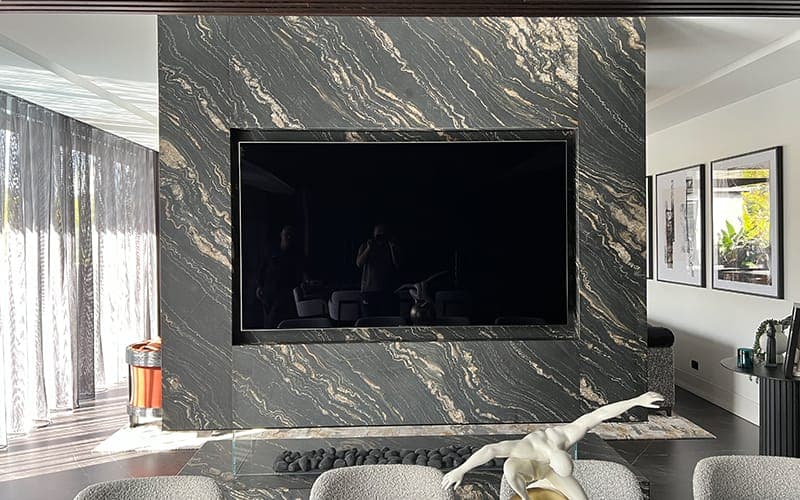
Systems to wire while building
- 01
TVs & projectors
TVs: RG6/coaxial cable to each TV and satellite/cable service. Smart TVs should be wired into the home network.
Projectors: Cat5/6 cable for HDMI to eliminate problems and allow you to upgrade the technology later.
- 02
Surround sound systems
Most people pre-wire a surround sound system in their main media room or theatre. You should also consider pre-wiring secondary areas. You may want more volume in larger rooms where TVs don't have the speaker capacity to fill the space.
Master bedroom, covered deck, pool, outdoors. If there's a room where you could enjoy more sound, consider a soundbar or full surround sound.
- 03
Home audio
This is the area that should have the most focus on pre-wiring. Once a client experiences quality home audio, it is almost guaranteed they will want it throughout the home. If you are going to spend a lot of time in any room of the house, we highly recommend pre-wiring for audio.
- 04
Outdoor speakers
Outdoor speakers are designed so you can hear the music but not see the speakers. Landscape speakers can be incorporated with your outdoor speakers in other areas: large entertaining areas, open patios, pool areas and throughout your backyard.
- 05
Satellite & internet providers
Internet pre-wire: this is where the utility companies (NBN) enter the home.
Satellite pre-wire: this prevents satellite companies from installing plastic conduit ducting on the outside of your home.
Some service providers require special cabling; we work with them for the best outcome.
- 06
Network & Wi-Fi access points
Hardwired network: Wi-Fi is great, but you still need to hardwire into the network where we can. It's best to hardwire TVs and video sources, and to run Ethernet ports anywhere you may want a wired connection.
Wi-Fi access points: through our experience, it's best to leave yourself options. We usually pre-wire multiple locations so access points can be moved later for maximum coverage.
- 07
Security systems & cameras
Security systems and cameras should be pre-wired. Wireless cameras are currently not stable enough to give you a consistently clear image.
Five mistakes we get called back to fix
None of these are the builder being careless. Electrical, comms and AV are three different trades with three different sets of rules, and on most sites nobody is asked to make them agree. These are the five that cost the most to put right afterwards.
- 01
Speaker and data cable run alongside the mains
Low-voltage audio and data cable picks up induced noise from 240V running beside it. You hear it as a hum in the system floor that no amount of fiddling with the amplifier removes. Electricians are not trained on this because it is not their trade, and by the time you hear it the plaster is on.
What it needs instead: Separate the runs, cross at right angles where they must meet, and keep audio away from the switchboard entirely.
- 02
No noggin behind the TV wall
Plasterboard on its own carries nothing. Without solid backing where the screen goes, the bracket has to land on whatever studs happen to be there, which is rarely where you wanted the television. A 75 inch screen 200 mm off centre is a thing you notice every night.
What it needs instead: Decide the screen position at frame stage and put a full-width noggin behind it, wider than you think you need.
- 03
The comms cabinet in a cupboard with no power
The NBN lead, the router and the switch all end up wherever the lead happened to enter, usually a linen cupboard with no socket, no ventilation and no room. Gear that runs hot in a sealed box fails early, and there is nowhere to add the switch the house will eventually need.
What it needs instead: A proper comms location: a double socket, airflow, and depth for a cabinet and patch panel.
- 04
One data point per room, or none at all
Wireless gets treated as a substitute for cable. It is not. Every access point, every smart TV and every camera still has to reach the network, and at frame stage a cable run costs a fraction of what it costs once the walls are closed and painted.
What it needs instead: Two points where the TV goes, one per bedroom and study, and a run to every future access point location.
- 05
Ceiling speakers positioned after the downlights
The electrician sets out the lighting first, the ceiling fills with downlights and ducting, and the speakers get squeezed into whatever gaps are left. Which is how you end up with a stereo pair three metres apart in the wrong axis and a centre channel nowhere near the screen.
What it needs instead: Set the speaker positions on the plan at the same time as the lighting, and let the two be coordinated rather than sequenced.
Common questions
- What should I pre-wire in my new home?
- Pre-wiring can help almost any smart home system, including wireless ones, because wireless devices must ultimately connect to cabled equipment. If you have the opportunity to build a new home, put pre-wiring at the top of your priority list to ensure a smooth build that anticipates all of your home's future demands.
- Can't my electrician pre-wire the house for AV?
- Think twice. Electricians lay wires for electrical switches and outlets, but the majority of smart home wiring is low voltage and unique, which is what we specialise in. Running a speaker wire beside an electrical cable, for example, could cause issues with your AV system. You may save a few dollars in the short term, but you may end up paying for it, and more, in the long run.
- When in the build should pre-wiring happen?
- Before the walls close up. Once plasterboard is on, running new low-voltage cable means cutting and patching, which costs far more than running it at frame stage.